three different types of

LOOPS

While

Keeps going until the condition is false.

Do while

Executes at least once, and then acts as a while loop.

For

Counted loop. Keeps going for a specified amount of time.

While Loop

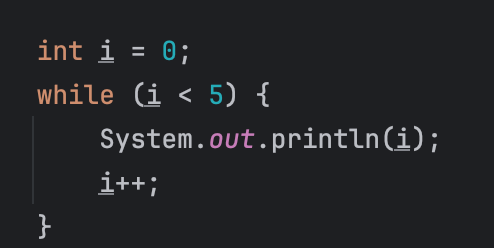
A while loop in programming is a repetitive structure that continues executing a block of code as long as a specified condition remains true. It's a way to automate tasks until a particular condition is met or becomes false.


This loop will keep going until i is equal to 5. The condition is false if i is equal or over 5 


Do While Loop

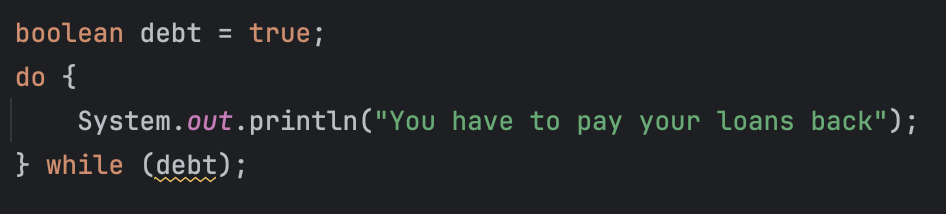
A do-while loop is a programming construct that executes a block of code at least once, and then repeatedly as long as a specified condition remains true. The key distinction is that the condition is checked after the initial execution, ensuring the block runs at least once.

This loop will run once and then keep running until the user pays back the debt. 


Do While Loop

A for loop is a control flow statement in programming that iterates over a sequence of elements, executing a specific block of code for each element. It typically consists of an initialization, a condition for iteration, and an update statement.
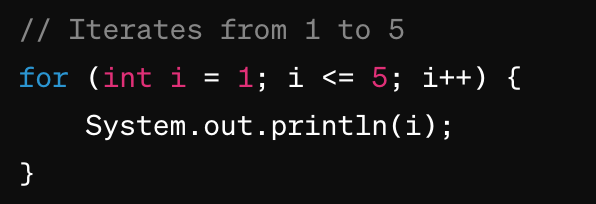
In this Java example, the for loop consists of three parts: the initialization (int i = 1), 


the condition for iteration (i <= 5), and the update statement (i++, which increments the variable i by 1 in each iteration). The loop body, enclosed in curly braces {}, contains the code to be executed for each iteration.



Nested Loops

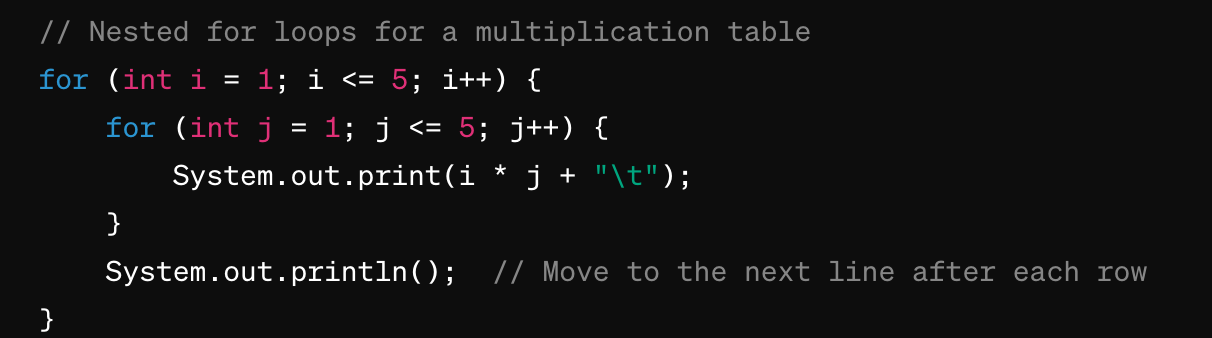
Nested for loops refer to the use of one or more for loops inside another for loop. This creates a nested or layered structure, allowing you to iterate over multiple sets of values. Each iteration of the outer loop triggers the execution of the entire inner loop. 

In this example, the outer loop (for (int i = 1; i <= 5; i++)) controls the rows, 


and the inner loop (for (int j = 1; j <= 5; j++)) controls the columns. The System.out.print(i * j + "\t"); statement prints the product of i and j with a tab space, creating a simple multiplication table. The System.out.println(); statement is used to move to the next line after each row. 

START EXERCISES