
INPUT VS OUTPUT
Input is what you give to a system, like typing on a keyboard. Output is what the system gives back, such as what appears on the screen in response to your input.
Input is what you give to a system, like typing on a keyboard. Output is what the system gives back, such as what appears on the screen in response to your input.
You can use the print statement to display text on the screen. Just make sure you add the quotations to make it work!

You can also use the same statement without the "ln" at the end in order to print statements on the same line.

In order to accept input from the user, you will have to follow three main steps.
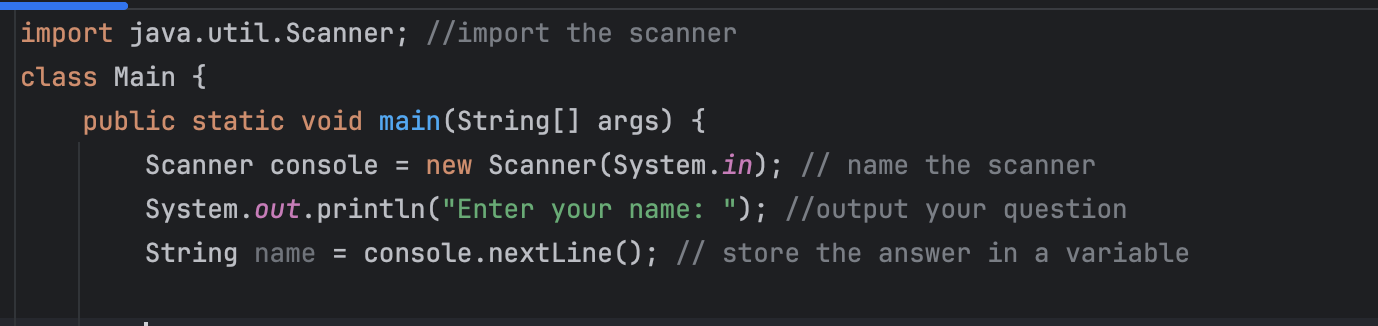
We will later explain what a variable is as well as its different types
Variables are like boxes we store information in. To get access to these boxes, you first have to name one. this is called DECLARING. Make sure you give it a meaningful name. It should start with a lowercase for it to be conventional.
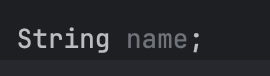
You will also have to assign a value to it, hence INITIALIZING it.

You will need different types of boxes (variables) in order to store different type of information in them.
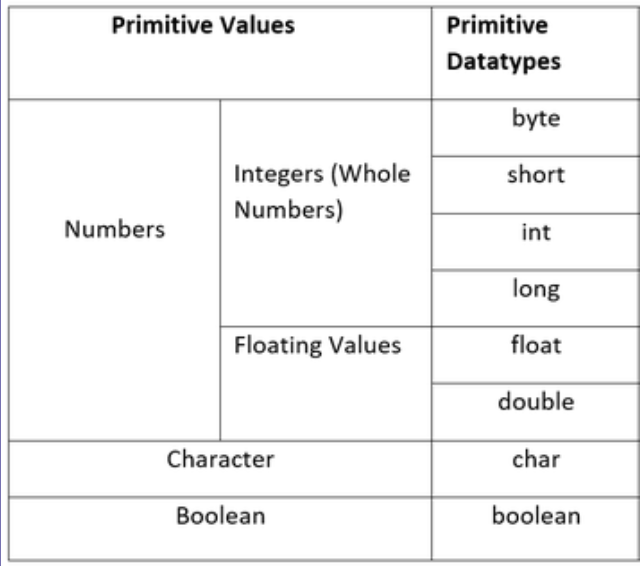
Floating values are values that contain decimals
Chars only contain one character like '@' or 'L'
Booleans are only either "true" or "false"
When accepting integers from users, make sure to change console.nextLine() to console.nextInt() , etc. Same goes for declaring. Change "String" to "Int".
NEXT STEPcreated with
Website Builder Software .